
Have you ever had an app idea but stopped because you did not know how to code?
In the past, turning an idea into software usually meant learning programming languages, understanding databases, setting up development tools, and spending countless hours fixing errors. In 2026, artificial intelligence is changing that process.
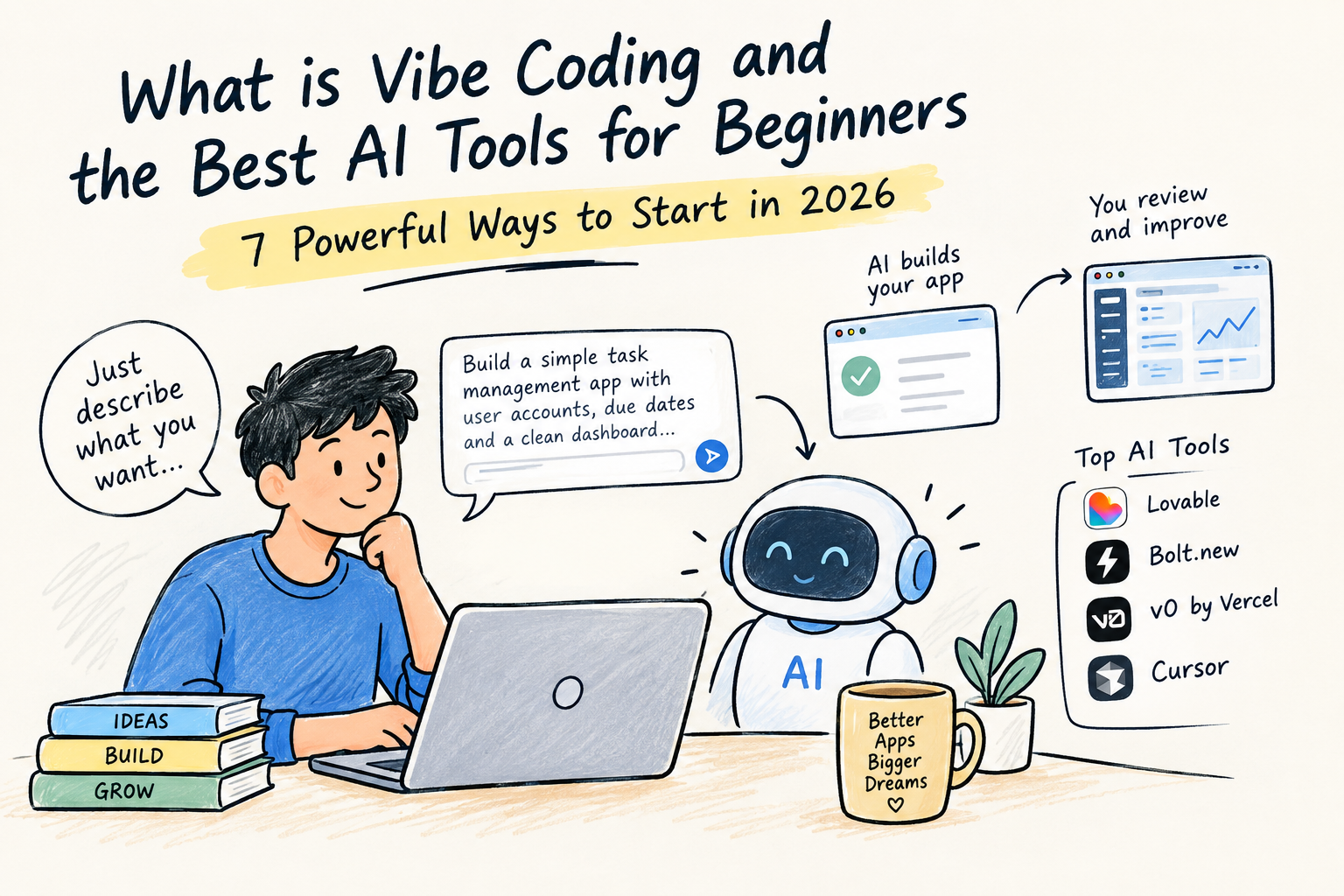
You can now describe an application in plain English, ask an AI tool to build it, review the result, and continue improving it through conversation.
This approach is commonly known as vibe coding.
But what exactly does vibe coding mean? Can someone with no programming background actually build useful software? And which AI coding tools are easiest for beginners?
This guide answers those questions and walks through the most practical ways to get started.
What Is Vibe Coding?
Vibe coding is an AI-assisted approach to software development where you describe what you want to build using natural language, while an AI system generates or modifies much of the underlying code.
Instead of manually writing every function, component, and configuration file, you can tell an AI what you want.
For example, instead of spending hours creating a basic expense tracker, you could write:
“Build a simple expense tracking web app where users can add expenses, select categories, view monthly totals, and see their spending in a clean dashboard.”
An AI coding platform can then generate an initial version of the application.
You can look at the result and continue giving instructions:
“Make the dashboard easier to read on mobile.”
Then:
“Add a monthly spending chart.”
And later:
“Allow users to export their transactions as a CSV file.”
This creates a conversational development process.
You explain the goal.
The AI builds.
You test.
You give feedback.
The AI changes the application.
That cycle is the foundation of vibe coding.
Why Is Vibe Coding Becoming So Popular in 2026?
The biggest reason is simple: software creation is becoming easier to start.
Programming is still a complex discipline, but beginners no longer have to understand every technical detail before creating their first prototype.
From Writing Code to Describing Ideas
Traditional development often begins with programming syntax.
AI-assisted development can begin with a description of the desired result.
That is a major difference for beginners.
Someone who understands a business problem but does not know JavaScript can now explain the problem to an AI coding tool and begin experimenting with a solution.
Faster Prototyping
Imagine a small business owner wants an internal inventory dashboard.
Previously, they might need to:
- Find a developer.
- Explain the requirements.
- Wait for a prototype.
- Request changes.
- Test multiple versions.
With AI-assisted development, they can create an early prototype themselves and use it to clarify what they actually need.
That does not mean professional developers are unnecessary.
It means the first stage of product development can happen much faster.
Lower Barrier for Non-Developers
Designers, marketers, founders, students, researchers, and creators can experiment with software without first becoming full-time programmers.
That accessibility is one of the biggest reasons the concept has attracted so much attention.
7 Powerful Ways Vibe Coding Can Help Beginners
1. Turn an Idea Into a Working Prototype
The easiest way to understand the value of AI-assisted development is to start with an idea.
Suppose you want to build a meal-planning application.
Instead of learning an entire programming stack first, you could tell an AI:
“Create a meal-planning web application where users can select dietary preferences, generate a weekly meal plan, create a shopping list, and save favorite recipes.”
The AI can create a first version that you can inspect and test.
It may not be perfect.
That is fine.
The purpose of the first version is to discover what works and what needs improvement.
2. Build Without Memorizing Programming Syntax
One of the biggest challenges for new programmers is syntax.
A small mistake can prevent code from running.
You might understand exactly what you want but have no idea how to express it in JavaScript, Python, React, or another programming language.
AI can handle much of that translation.
You can explain:
“When the user clicks the button, show a confirmation message and reset the form.”
The AI can determine how that behavior should be implemented.
However, this does not mean technical knowledge has become worthless.
Understanding basic concepts such as databases, APIs, authentication, and frontend development becomes increasingly useful as your projects become more advanced.
3. Experiment With Business Ideas Faster
Vibe coding can be particularly useful for entrepreneurs.
Suppose you have an idea for a niche SaaS product.
Instead of spending months building a complete platform before knowing whether anyone wants it, you can create a basic prototype and show it to potential users.
For example:
“Build a simple appointment management dashboard for independent fitness coaches. Include client profiles, appointment scheduling, payment status, and weekly revenue.”
That prototype can help answer an important question:
Do people actually find this useful?
The AI is not replacing product research.
It is making experimentation faster.
4. Create Custom Tools for Everyday Problems
You do not have to build a startup.
Some of the most useful AI-generated applications can be extremely simple.
You could create:
- A personal budget tracker
- A workout planner
- A project dashboard
- A reading tracker
- A travel planner
- A client management tool
- A content calendar
- A study planner
- A small inventory system
- A freelance invoice tracker
The advantage is customization.
Instead of adapting your workflow to someone else’s software, you can experiment with a tool designed around your own process.
5. Improve Designs Through Conversation
AI coding tools can also help people who think visually.
You can tell the AI:
“The dashboard feels too crowded. Increase the spacing, make the primary statistic larger, and simplify the navigation.”
Then:
“Make the mobile version easier to use with one hand.”
Then:
“Use a more professional editorial style and reduce unnecessary borders.”
This creates an iterative design process.
You do not have to know the exact CSS property required to make the change.
You describe the experience you want.
6. Learn Programming While Building Real Projects
Vibe coding can also become a learning tool.
Instead of reading programming tutorials for weeks before creating anything, you can build a small project and ask the AI questions about the generated code.
For example:
“Explain what this function does in simple terms.”
Or:
“Why is this component separated from the main page?”
Or:
“What would happen if I removed this database query?”
This can turn a real project into a practical classroom.
The important part is to remain curious about what the AI is doing instead of blindly accepting every answer.
7. Move From Prototype to a More Complete Product
Once a basic application works, you can gradually add more functionality.
A simple project might evolve like this:
Version 1: Basic interface
↓
Version 2: User accounts
↓
Version 3: Database
↓
Version 4: Search and filtering
↓
Version 5: Payments or external integrations
↓
Version 6: Analytics and monitoring
This incremental approach is much safer than asking an AI to build a huge application with dozens of features in one request.
The Best AI Tools for Beginners in 2026
There is no single AI coding tool that is perfect for everyone.
Your choice should depend on what you want to build and how much technical control you want.
Lovable: A Beginner-Friendly Way to Build Web Apps
Lovable is designed around natural-language application development.
You describe the application, review the generated interface, and continue refining it through conversation.
Its current platform supports application development, backend functionality, integrations, and deployment. Lovable also provides integration with Supabase for databases, authentication, storage, and related backend functionality.
It can be useful for beginners who want to create:
- SaaS prototypes
- Customer portals
- Business dashboards
- Internal tools
- Web applications
A useful first prompt might be:
“Create a professional customer dashboard for a small subscription business. Include account information, subscription status, invoices, and a responsive mobile layout. Keep the design simple and easy to navigate.”
Bolt.new: Build and Experiment in the Browser
Bolt is designed to let users create and work with web applications through an AI-assisted development environment.
It is particularly interesting for people who want to experiment with full-stack applications while keeping much of the development process inside the browser.
Beginners can start with a focused request such as:
“Build a task management application with user accounts, categories, due dates, task status, and a simple dashboard.”
Once that works, additional features can be introduced gradually.
Bolt can be useful for people who want a little more exposure to how modern web applications are structured while still relying heavily on AI assistance.
v0 by Vercel: Strong for Modern Interfaces
v0 is especially useful when interface design is an important part of the project.
Vercel describes v0 as an application-building agent that can turn natural-language instructions into working applications and support production-oriented workflows.
It can be useful for:
- SaaS dashboards
- Landing pages
- Product interfaces
- React applications
- Interactive prototypes
For example:
“Create a premium analytics dashboard for a financial research platform with responsive navigation, clear data cards, strong typography, and an uncluttered mobile layout.”
You can then continue refining the design through additional instructions.
Cursor: A Good Bridge Toward Professional Development
Cursor takes a more code-focused approach.
It is an AI-powered code editor that allows users to work directly with project files while using AI to understand, modify, and develop the codebase.
Its Agent can work across files, run commands, and help complete development tasks.
This makes it particularly interesting for beginners who eventually want to understand traditional software development.
You can let AI handle difficult implementation work while gradually learning what is happening inside the project.
A Simple Comparison for Beginners
| Tool | Main Strength | Good For |
|---|---|---|
| Lovable | Complete web-app creation | Beginners and rapid prototypes |
| Bolt | Browser-based development | Full-stack experiments |
| v0 | Interface and application design | Modern UI and React projects |
| Cursor | AI-assisted coding | Learning and larger projects |
Rather than asking which platform is universally the best, ask:
What am I trying to build?
That question will usually lead you to a better choice.
How to Start Your First Vibe Coding Project
You do not need a complicated idea.
Start with one problem.
Step 1: Define the User
Who will use the application?
For example:
“The application is designed for freelance graphic designers who manage multiple clients.”
Step 2: Define the Problem
What problem does it solve?
“Freelancers often forget which clients have unpaid invoices.”
Step 3: Define the Minimum Features
Start with only the essentials:
- Add clients
- Create invoices
- Track payment status
- View unpaid invoices
- Calculate outstanding revenue
Step 4: Describe the Design
Tell the AI how you want it to feel.
For example:
“Create a clean professional dashboard with simple navigation, readable typography, responsive cards, and a calm business-oriented visual style.”
Step 5: Build the First Version
Let the AI generate the initial application.
Do not worry if it is not perfect.
Your first version is a starting point.
Step 6: Test It Like a Real User
Click everything.
Try incorrect information.
Test it on a phone.
Try creating multiple records.
See what happens when something goes wrong.
Step 7: Improve One Thing at a Time
Instead of saying:
“Fix the entire application.”
Try:
“The invoice form allows users to submit an empty client name. Add validation and display a clear message before submission.”
Specific instructions usually make iteration easier.
A Beginner Prompt You Can Copy and Use
If you are trying an AI coding tool for the first time, start with something like this:
“Build a simple web application for [describe your idea]. The target users are [describe users]. The main problem it should solve is [describe problem]. Include these core features: [list features]. Create a clean, modern, responsive interface that works well on desktop and mobile. Keep the first version simple and focus on reliable core functionality. Do not add unnecessary features unless they are required for the main workflow.”
This gives the AI enough context without overwhelming it.
Once the first version works, continue with smaller prompts.
Important Risks Beginners Should Understand
Vibe coding can make development easier, but AI-generated software is not automatically perfect.
AI Can Make Mistakes
An AI can misunderstand requirements or generate code that appears correct but contains hidden problems.
Always test important functionality.
Security Still Matters
Applications handling passwords, payments, personal information, or private business data require careful security review.
Never place private API keys directly into publicly accessible frontend code.
Large Projects Become More Difficult
As applications grow, the number of files, dependencies, and interactions increases.
The AI may have difficulty maintaining consistency across a very large project.
Breaking the application into smaller features can help.
A Working Prototype Is Not Automatically Production-Ready
There is a major difference between:
“It works on my screen.”
and
“Thousands of users can safely depend on it.”
Production software may require security testing, performance optimization, monitoring, backups, error handling, accessibility checks, and professional review.
Do You Still Need to Learn Coding?
This is one of the most important questions beginners ask.
The answer depends on your goals.
If you simply want to build a small personal tool, you may be able to accomplish a surprising amount with AI and minimal programming knowledge.
If you want to become a professional software engineer, however, learning programming fundamentals remains extremely valuable.
You do not necessarily need to memorize every syntax rule.
But you should understand concepts such as:
- Variables
- Functions
- APIs
- Databases
- Authentication
- Frontend and backend systems
- Git and version control
- Security
- Deployment
Think of AI as a development partner rather than a replacement for understanding.
The more you understand, the better you can direct it.
What Does the Future of Vibe Coding Look Like?
Vibe coding represents a broader change in how humans interact with computers.
For decades, people had to learn the computer’s language.
Now, computers are becoming increasingly capable of understanding ours.
That does not mean traditional software engineering disappears.
Instead, the role of the developer can shift toward architecture, product decisions, security, testing, system design, and reviewing AI-generated work.
For non-developers, the change may be even more significant.
A founder can prototype an idea.
A designer can build an interactive concept.
A marketer can create an internal tool.
A student can turn an idea into a working project.
A small business can experiment with custom software without starting with a large development team.
The technology is still evolving, but the direction is clear: the distance between having an idea and building a prototype is becoming much smaller.
Final Thoughts
If you have ever thought, “I have a great app idea, but I don’t know how to code,” vibe coding gives you a new way to start.
You do not need to build a massive application on your first attempt.
Choose one small problem.
Describe it clearly.
Build the first version.
Test it.
Ask the AI to improve it.
Then learn from what it created.
The most valuable skill may not be knowing every programming command. It may be knowing what you want to build, why people need it, and how to communicate that idea clearly to an AI system.
That is where vibe coding becomes genuinely useful.
The code may be generated by AI, but the idea, judgment, testing, and direction still come from you.
Frequently Asked Questions
What is vibe coding in simple terms?
Vibe coding means using natural-language instructions to guide AI in creating or modifying software instead of manually writing every part of the code yourself.
Can someone with no coding experience use AI coding tools?
Yes. Beginner-friendly platforms allow users to describe applications in ordinary language. However, learning basic software concepts becomes increasingly useful as projects become more complex.
What are the best AI tools for beginners?
Popular options include Lovable, Bolt, v0, and Cursor. Each has a different focus, so the right choice depends on whether you want rapid application creation, browser-based development, modern UI design, or a more code-focused workflow.
Can vibe coding build a real website or application?
Yes. AI-assisted development platforms can create working websites and applications. More complex or business-critical products still require proper testing, security checks, maintenance, and human oversight.
Is vibe coding the same as no-code?
No. No-code platforms generally use predefined visual components and workflows. Vibe coding relies more heavily on natural-language instructions and AI-generated or AI-modified code.
Should beginners learn programming before trying vibe coding?
Not necessarily. You can start experimenting immediately and learn programming concepts as you build. If your goal is professional software development, however, programming fundamentals remain highly valuable.

I am Bhaktahari Dahal, the founder and writer of Byte and Trail. I passionately research technology, blogging, and diverse fields to deliver clear, simplified, and engaging content for my readers. Welcome aboard!