

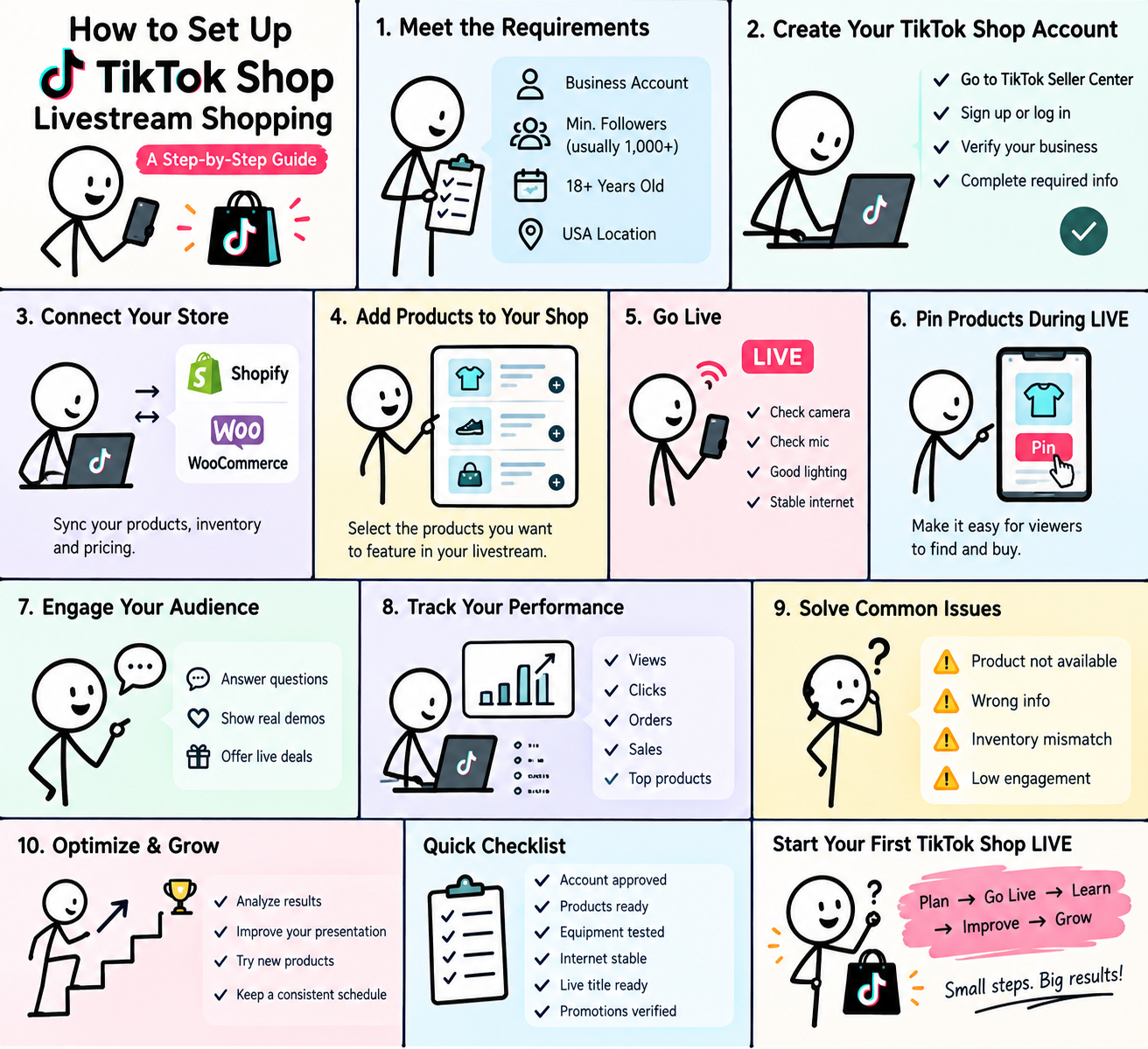

TikTok Shop livestream shopping allows U.S. sellers to showcase products, answer questions, and take orders while they are live. To get started, you generally need an approved TikTok Shop seller account, eligible products, access to TikTok LIVE, and a properly connected product catalog.
If you want to learn how to set up TikTok Shop livestream shopping, the process can be broken into a few simple stages: create and verify your shop, prepare your products, connect your ecommerce store if needed, organize your LIVE products, and then start selling through TikTok LIVE.
This guide explains the process in simple steps so you can understand what you need before launching your first shoppable livestream in the United States.
What Is TikTok Shop Livestream Shopping?
TikTok Shop livestream shopping combines live video with online shopping. Instead of simply watching a creator demonstrate a product, viewers can interact with the host, ask questions, see products in action, and access shopping options during the livestream.
For sellers, this creates a more direct way to demonstrate products and communicate with potential customers.
A typical TikTok Shop LIVE can include:
- A host demonstrating one or more products
- Real-time questions and answers
- Product links or shopping-bag access
- Product demonstrations and comparisons
- LIVE promotions or discounts
- Real-time engagement with viewers
The main advantage is convenience. A viewer can discover a product through entertaining content and continue into the shopping experience without having to search for the product separately.
How to Set Up TikTok Shop Livestream Shopping
The basic process is straightforward: create and verify your TikTok Shop, prepare your products, connect your ecommerce store if you use one, organize the products for your livestream, and then launch your LIVE using TikTok’s available shopping tools.
However, there is an important detail to understand first.
TikTok has different requirements for merchants, official shop creators, marketing creators, and affiliate creators. Therefore, there is no single follower requirement that applies to everyone who wants to sell through TikTok Shop.
TikTok Shop Live Shopping Requirements in the USA
Before learning how to sell products on TikTok Live, make sure you understand the current requirements for the type of account you plan to use.
TikTok’s U.S. requirements can vary depending on whether you are selling your own products or promoting products for another seller.
1. You Must Meet the Age and Location Requirements
TikTok Shop has age and location requirements for U.S. sellers and creators.
For U.S. creator access, TikTok currently requires creators to be at least 18 years old and based in the United States. TikTok may also require identity and age verification during the onboarding process.
For individual U.S. sellers, TikTok’s seller registration process also requires applicants to meet its age and U.S. residency requirements.
This means you should prepare accurate personal or business information before beginning registration.
Your legal name, address, identification, tax information, and other details should match the documents you provide during verification.
2. How Many Followers Do You Need to Sell on TikTok Shop Live?
This is one of the most common questions about TikTok Shop.
The answer depends on your account type.
U.S. merchants selling their own products do not have a general minimum follower requirement to join TikTok Shop.
That means a new seller does not necessarily need thousands of followers before opening a TikTok Shop and selling their own products.
Creator requirements are different.
For example, TikTok’s current U.S. Creator Eligibility Policy states that Affiliate Creators need at least 1,000 followers to qualify.
Official Shop Creators do not have a minimum follower requirement to bind with their own TikTok Shop.
Marketing Creators can also have different requirements depending on whether they are selling their own products or promoting products from other sellers.
So, when someone asks how many followers to sell on TikTok Shop Live, the answer depends on what type of TikTok Shop activity they want to perform.
Here is the simple breakdown:
- U.S. Merchant: No general follower requirement to join TikTok Shop and sell your own products.
- Official Shop Creator: No minimum follower requirement to bind with the shop.
- Affiliate Creator: At least 1,000 followers are currently required for creator eligibility.
- Marketing Creator: Additional requirements can apply when promoting products from other sellers.
This distinction is important because many older articles still claim that every TikTok Shop seller needs a specific number of followers. That information may not apply to the current U.S. merchant setup.
3. Create a TikTok Shop Seller Center Account
If you want to sell your own products, your first major step is creating a TikTok Shop Seller Center account.
TikTok Seller Center is the central management platform for your TikTok Shop. It allows sellers to manage important areas of their ecommerce operation, including products, orders, promotions, and other selling tools.
Start by opening the TikTok Shop Seller Center for the U.S. market and selecting the appropriate registration option.
Depending on your business structure, you may register as an individual or as a business entity.
During registration, you may need information such as:
- Legal name or registered business name
- Date of birth or business information
- U.S. address
- Tax information
- Identity documents
- Bank account information
- Business verification documents, when applicable
Make sure the information you submit is accurate.
For example, if your legal documents contain your full legal name, avoid entering a shortened or completely different name during verification.
Small inconsistencies can create unnecessary verification problems.
Why TikTok Seller Center Matters
TikTok Seller Center is not simply an account-registration page.
It becomes the main management area for your TikTok Shop.
Depending on your account and available features, you can use Seller Center to manage:
- Products
- Inventory
- Orders
- Promotions
- Affiliate activity
- LIVE selling
- Shop performance
- Customer-related operations
TikTok’s current U.S. Seller Center also provides a dedicated LIVE selling area where sellers can access LIVE-related resources and tools.
This makes Seller Center an important part of your TikTok Seller Center livestream setup.
4. Prepare Your Products Before Going LIVE
Creating a seller account is only the beginning.
Before starting your first livestream, you need to make sure the products you want to sell are properly prepared.
Think of your product catalog as the foundation of your TikTok Shop.
Even if your LIVE presentation is excellent, customers may hesitate to buy if the product page contains poor images, unclear information, incorrect pricing, or unavailable inventory.
Before going LIVE, review each product carefully.
Your product listing should contain:
- A clear and accurate product title
- High-quality product images
- A useful product description
- Correct pricing
- Available inventory
- Correct product variations
- Shipping information
- Any required compliance information
You should also make sure the product itself is eligible for TikTok Shop.
Not every product category is automatically allowed.
TikTok Shop has product and content policies that sellers must follow. Certain products may be restricted or prohibited, while other categories can require additional information or approval.
For this reason, check TikTok’s current seller policies before building your livestream around a particular product.
5. Choose the Right Products for Your First LIVE
You do not need to showcase your entire catalog during your first livestream.
In fact, starting with too many products can make the broadcast difficult to manage.
A better approach is to create a focused product lineup.
For example, your first LIVE could include:
Main Product: The product you want to spend the most time demonstrating.
Complementary Product: An item that naturally works with the main product.
Bundle or Promotional Product: An option that gives viewers another purchasing choice.
This approach makes the livestream easier to follow.
It also gives the host a clear order for presenting products.
Instead of jumping randomly from one product to another, you can build a simple story around the products.
For example:
- Introduce the problem.
- Present the main product.
- Demonstrate how it works.
- Answer viewer questions.
- Show the complementary product.
- Explain the available offer.
- Move to the next product.
A simple structure can make a LIVE feel much more professional.
6. Set Up TikTok Shop Integration With Shopify
If your online store already uses Shopify, you may be able to connect it with TikTok Shop rather than manually managing every product separately.
The TikTok Shop integration with Shopify can help eligible merchants synchronize important ecommerce information between their Shopify store and TikTok Shop.
Depending on the setup, this can include product information, inventory, orders, and fulfillment-related data.
The basic process looks like this:
- Open your Shopify admin.
- Find the TikTok sales channel.
- Connect your TikTok account.
- Complete the required TikTok Shop onboarding.
- Review your product catalog.
- Check which products are eligible for synchronization.
- Confirm your inventory and order settings.
The exact options available can depend on your location, store eligibility, and TikTok Shop configuration.
The biggest benefit is reducing duplicate work.
If you already operate an established Shopify store, keeping your product information synchronized can make TikTok Shop easier to manage.
7. Check Your Product Information Before Going LIVE
Never assume that a synchronized product is automatically ready for your livestream.
Before the broadcast, manually review the products you intend to feature.
Check:
- Product name
- Product image
- Price
- Inventory
- Product variations
- Description
- Shipping details
- Product availability
This simple check can prevent embarrassing problems during a LIVE.
Imagine telling viewers that a product is available, only to discover that the displayed variation is out of stock.
A few minutes of preparation can help avoid situations like this.
8. Prepare Your LIVE Equipment
You do not need an expensive studio to start TikTok Shop livestream shopping.
A beginner setup can be relatively simple.
At minimum, you need:
- A reliable smartphone or computer
- Stable internet
- Clear lighting
- Good-quality audio
- A clean background
- Your products within easy reach
Audio is particularly important.
Viewers may forgive average video quality, but poor audio can make a livestream difficult to watch.
If you are demonstrating physical products, make sure the camera angle allows viewers to see the item clearly.
For small products, a close-up demonstration can be more useful than simply holding the product in front of the camera.
9. Prepare a Simple LIVE Script
Going LIVE without a plan can quickly become uncomfortable, especially if you are new to livestreaming.
You do not need to memorize a long script.
Instead, prepare a simple outline.
For each product, know:
- What problem does it solve?
- Who is it for?
- What are its main features?
- What makes it useful?
- How does it work?
- What questions might customers ask?
- What is the current price?
- Is there a promotion or bundle?
This gives you enough information to speak naturally without sounding like you are reading an advertisement.
A good LIVE should feel like a conversation rather than a television commercial.
10. Promote Your LIVE Before It Starts
Do not wait until the moment you go LIVE to tell people about it.
If TikTok provides LIVE Event features for your account, you can schedule the event in advance and promote it to your audience.
You can also use regular TikTok videos to create awareness before the broadcast.
For example, you could publish a short video showing:
- The product you will demonstrate
- A common problem the product solves
- A quick preview of the upcoming offer
- A behind-the-scenes look at your preparation
The goal is simple: give potential viewers a reason to remember the LIVE.
What You Should Have Ready Before Your First TikTok Shop LIVE
Use this quick checklist before starting your first livestream:
Account: TikTok Shop is approved and LIVE access is available.
Products: Products are approved, correctly listed, and in stock.
Catalog: Product titles, images, prices, and variations are accurate.
Store: Shopify or another supported ecommerce system is connected if required.
Equipment: Camera, microphone, lighting, and internet connection are ready.
Presentation: Products are physically available for demonstration.
Script: Key benefits, features, prices, and common questions are prepared.
Promotion: Your audience knows when the LIVE will happen.
Once these elements are ready, you can move to the actual livestream setup.
How to Set Up and Run Your First TikTok Shop LIVE
Once your TikTok Shop account, products, and basic equipment are ready, the next step is setting up the actual livestream.
This is where TikTok Shop becomes more than a regular livestream. Instead of simply talking to viewers, you can feature products during the broadcast and give viewers a direct path to explore and purchase them.
The key is to keep the shopping experience simple. Viewers should quickly understand what you are selling, why it is useful, and where they can find it.
Step 1: Open TikTok LIVE
Start by opening TikTok and selecting the option to create a LIVE.
Depending on your account, device, and available features, TikTok may provide different LIVE tools and interfaces.
Before starting the broadcast, check your camera, microphone, lighting, and internet connection.
You should also make sure the products you plan to feature are ready and within reach.
Do not start the LIVE while you are still searching for products or checking your equipment.
A few minutes of preparation can make the broadcast look much more professional.
Step 2: Create a Clear LIVE Title
Your LIVE title should immediately tell viewers what they can expect.
Avoid vague titles such as:
“Come Join Me!”
Instead, make the purpose clear.
For example:
Live Product Demo + Special Offers
or
Kitchen Gadget LIVE: Demo, Q&A & Deals
or
Beauty Essentials LIVE: See How They Work
A useful title can help viewers understand the topic before they enter the broadcast.
Keep it short and easy to understand.
The viewer should not have to guess what the LIVE is about.
Step 3: Select the Products You Want to Feature
Before or during your LIVE setup, select the products you want to make available to viewers.
The exact interface can vary depending on TikTok’s current version and account type, but the general process involves choosing eligible products from your TikTok Shop catalog.
Do not add every product you sell.
Instead, choose products that are directly related to the topic of your livestream.
For example, if your LIVE is about home organization, your product list could include:
- Storage containers
- Drawer organizers
- Label makers
- Shelf organizers
- A bundle of related products
Keeping the product selection focused makes it easier for viewers to follow the presentation.
Step 4: Organize the Product Order
The order in which products appear can influence how smoothly your LIVE runs.
Start with your strongest or most relevant product.
Then move naturally to complementary products.
A simple structure could look like this:
Product 1: Main product
Product 2: Related product
Product 3: Lower-priced option
Product 4: Bundle or special offer
This gives viewers a logical shopping journey.
It also prevents the host from jumping randomly between unrelated products.
Step 5: Pin a Product During Your LIVE
One of the most useful shopping features is the ability to feature a product while you are talking about it.
When discussing a particular product, use TikTok’s available product-pinning or product-feature controls to make that item easier for viewers to find.
For example, imagine you are demonstrating a wireless microphone.
Instead of simply saying:
“You can find this microphone in my shop.”
You can explain what you are showing and direct viewers to the product displayed through the LIVE shopping interface.
This creates a much clearer connection between the conversation and the product.
When you move to another item, update the featured product when the available LIVE controls allow it.
Step 6: Demonstrate Instead of Just Describing
A common mistake new sellers make is talking about a product for several minutes without actually showing how it works.
LIVE shopping gives you something a normal product page cannot provide easily: real-time demonstration.
If you sell a kitchen appliance, demonstrate it.
If you sell clothing, show the fit and different details.
If you sell a beauty product, explain how it is used while following the relevant platform and product policies.
If you sell technology, show the important functions on camera.
The basic principle is simple:
Show the benefit instead of only describing the feature.
Instead of saying:
“This bottle has a leak-proof design.”
Show the bottle being closed and demonstrate the relevant feature.
Instead of saying:
“This organizer saves space.”
Show how much space the organizer can help manage.
Demonstrations make the livestream more useful and give viewers more information before they decide whether to buy.
Step 7: Use the First Two Minutes Wisely
The opening moments of your LIVE are extremely important because viewers can leave at any time.
Do not spend the first two minutes saying:
“Can everyone hear me?”
“Where are you watching from?”
“Wait a few minutes for people to join.”
Instead, begin with the reason people should stay.
For example:
“Today I’m testing three of the most useful desk accessories in my shop, and I’m going to show you exactly how each one works.”
Then immediately begin the demonstration.
A strong opening can follow this simple structure:
Hook → Product → Benefit → Demonstration → Invitation to interact
For example:
“Looking for a faster way to organize a messy desk? I’m testing this compact organizer today. I’ll show you how much it can actually hold, and then we’ll compare it with a second model.”
This gives viewers a reason to continue watching.
Step 8: Answer Viewer Questions in Real Time
Interaction is one of the biggest differences between livestream shopping and a normal product page.
Pay attention to the comments and answer useful questions as they appear.
Viewers may ask:
“Does it come in black?”
“What size is this?”
“How long does shipping take?”
“Is this suitable for beginners?”
“Does it work with iPhone?”
“Is there a warranty?”
Answer clearly and honestly.
If you do not know an answer, do not guess.
Instead, tell the viewer that you will verify the information.
Accuracy is more valuable than giving a fast but incorrect answer.
Step 9: Turn Questions Into Product Demonstrations
A question from one viewer can often help many other viewers.
Suppose someone asks:
“Is this bottle really leak-proof?”
Instead of simply answering “yes,” demonstrate the relevant feature if it is safe and practical to do so.
Similarly, if someone asks whether a jacket has enough room for layering, show the fit or explain the measurements.
This creates a useful cycle:
Question → Answer → Demonstration → More engagement
It can also help viewers who are watching silently but have the same question.
Step 10: Use LIVE-Exclusive Offers Carefully
Promotions can create urgency, but discounts should be clear.
If you have a valid TikTok Shop promotion, explain:
- What the offer is
- Which product it applies to
- When it expires
- Whether there are eligibility conditions
- How viewers can use it
Avoid creating fake urgency.
Do not tell viewers that an offer expires in five minutes if that is not true.
Trust is particularly important in livestream shopping because the host is directly communicating with potential customers.
A clear offer sounds more professional than exaggerated claims.
Step 11: Create Product Bundles When Appropriate
A bundle can make sense when several products naturally belong together.
For example:
Camera Bundle
- Webcam
- Tripod
- Microphone
- Lighting accessory
Or:
Home Office Bundle
- Desk organizer
- Laptop stand
- Mouse pad
- Cable organizer
The bundle should provide a genuine reason for buying the products together.
Do not combine unrelated products simply to create a larger order.
The goal is to make the buying decision easier.
Step 12: Keep the Conversation Moving
A LIVE can lose energy when the host talks about the same product for too long.
A simple rhythm can help:
Introduce → Demonstrate → Explain → Answer → Offer → Move on
For example:
“Here’s the product.”
“Let me show you how it works.”
“These are the three features that matter most.”
“Someone just asked whether it works with Android.”
“Yes, here’s how you connect it.”
“It’s currently available in these variations.”
“Now let’s compare it with the next model.”
This creates a natural flow.
Step 13: Compare Products Clearly
Product comparisons can be particularly useful when your store sells several similar items.
Suppose you sell two microphones.
Instead of saying:
“This one is better.”
Explain the differences.
For example:
Model A
- Smaller
- Easier to carry
- Designed for simple setups
Model B
- More features
- Larger control options
- Better suited to more advanced users
Then allow viewers to decide which option fits their needs.
Clear comparisons are more useful than simply calling one product “the best.”
Step 14: Make Your LIVE Feel Human
People join livestreams because they want interaction, not because they want to watch someone read a product description.
Use natural language.
Tell viewers what you are actually doing.
If something does not work perfectly during the demonstration, stay calm and explain what happened.
You do not need to make every second look perfectly scripted.
A natural conversation can make the presentation feel more authentic.
At the same time, avoid unnecessary filler.
You do not need to repeat:
“Guys, guys, guys…”
every few seconds.
Give viewers useful information instead.
Step 15: Use a Simple Selling Formula
For each product, use this five-part formula:
Problem → Product → Demonstration → Benefit → Action
Problem
Start with the problem your audience may have.
Product
Introduce the product as a possible solution.
Demonstration
Show how it works.
Benefit
Explain why the feature matters.
Action
Tell viewers where they can find the product in the LIVE shopping interface.
For example:
“Cables getting messy under your desk? This organizer keeps them separated. Let me show you how it attaches. Once it’s installed, you can route each cable through its own section. If you want to check the current product details, open the featured product in the LIVE.”
This approach keeps the sales message useful rather than aggressive.
Step 16: Monitor Your LIVE Performance
Selling does not stop when the livestream begins.
During the broadcast, pay attention to the information available through TikTok’s LIVE and Shop tools.
Depending on your account and available analytics, you may be able to monitor information related to:
- Viewers
- Engagement
- Product interactions
- Orders
- Sales
- Product performance
These numbers can help you understand what happened during the session.
For example, if many viewers watched a product demonstration but very few interacted with the product, you may need to improve the product explanation or presentation.
If one product receives substantially more attention than another, that information can help you plan future content.
Step 17: Do Not Ignore the Comments
The comment section can provide valuable information.
Watch for repeated questions.
If five viewers ask the same question, that is a signal that your product explanation may not be clear enough.
Instead of answering the same question individually, address it for everyone.
For example:
“I’ve seen several people asking about sizing, so let me explain the measurements before we move on.”
This turns a comment into useful content for the entire audience.
Step 18: End the LIVE With a Clear Summary
Do not suddenly end the broadcast with:
“Okay, bye!”
Before finishing, briefly summarize what viewers saw.
For example:
“Today we covered three products: the desk organizer, laptop stand, and cable-management kit. If you want to review any of them, check the products featured in this LIVE.”
Then answer any final questions if appropriate.
A clear ending makes the livestream feel complete.
What Makes a TikTok Shop LIVE Effective?
Successful livestream shopping is not simply about talking continuously or repeatedly telling viewers to buy.
A useful LIVE usually combines several elements:
- Clear product information
- Demonstrations
- Genuine interaction
- Easy-to-understand offers
- Good presentation
- Accurate answers
- Strong product selection
- Consistent audience engagement
The goal is to help viewers make an informed purchasing decision.
When viewers understand the product, see it working, get their questions answered, and can easily find the item, the shopping experience becomes much smoother.
Your First TikTok Shop LIVE Checklist
Before pressing the LIVE button, run through this final checklist:
☐ TikTok Shop is approved.
☐ LIVE access is available.
☐ Featured products are approved.
☐ Inventory is checked.
☐ Product information is accurate.
☐ Camera is ready.
☐ Microphone is working.
☐ Lighting is adequate.
☐ Internet connection is stable.
☐ LIVE title is clear.
☐ Product order is prepared.
☐ Opening hook is ready.
☐ Product demonstrations are prepared.
☐ Common questions are anticipated.
☐ Promotions are verified.
☐ The host knows how to feature the relevant products.
Once these boxes are checked, you are ready to move from setup to optimization.
What Comes Next?
Getting your first TikTok Shop LIVE running is only the beginning.
The next challenge is understanding what happened after the broadcast.
Which product attracted the most attention?
Which product generated clicks?
Which product produced sales?
Where did viewers leave?
Which questions appeared repeatedly?
And how can the next LIVE perform better?
These questions aHow to Set Up TikTok Shop Livestream Shopping: A Step-by-Step Guide
Track, Improve, and Grow Your TikTok Shop LIVE
Starting your first TikTok Shop livestream is an important milestone, but the real opportunity begins after the LIVE ends.
A single livestream can tell you a lot about your audience. You can learn which products attracted attention, which questions people asked, where viewers lost interest, and which parts of your presentation deserve improvement.
Instead of treating every LIVE as a one-time event, use each broadcast as a learning opportunity.
How to Track TikTok Shop LIVE Performance
After your livestream, review the performance information available through TikTok’s analytics and Seller Center tools.
Depending on your account type and available features, you may be able to review information such as:
- LIVE views
- Viewer engagement
- Product clicks
- Product interactions
- Orders
- Sales
- Revenue
- Product performance
- Audience-related metrics
These numbers can help you understand what happened during the broadcast.
For example, a product may receive a large number of views but very few clicks. That could mean the product attracted attention but the presentation did not give viewers enough reason to explore it.
Another product may receive fewer views but generate more purchases.
That difference is valuable.
Look Beyond Total Views
A large viewer count can look impressive, but views alone do not tell you whether your livestream was commercially effective.
Imagine two products.
Product A receives 10,000 impressions but very little shopping activity.
Product B receives 3,000 impressions but generates substantially more product interactions and orders.
The second product may deserve more attention in your next LIVE.
This is why sellers should look at multiple metrics rather than focusing on a single number.
Ask:
Did viewers stay?
Did they interact?
Did they click the product?
Did they ask questions?
Did they purchase?
Which product generated the strongest response?
These questions give you a much clearer picture of your livestream.
Identify Your Best-Performing Products
After several livestreams, patterns can start to appear.
You may discover that certain products consistently attract attention while others receive very little interest.
Create a simple record for every LIVE.
For each product, track:
- Product name
- Number of times featured
- Viewer response
- Product clicks
- Orders
- Sales
- Questions received
- Common objections
This information can help you decide which products deserve more airtime.
If a product repeatedly receives questions but few purchases, investigate why.
Maybe the price is unclear.
Maybe viewers do not understand the main benefit.
Maybe the demonstration is weak.
Maybe shipping information is creating hesitation.
Analytics cannot always tell you the reason by themselves, but they can show you where to investigate.
Use Viewer Questions as Market Research
Your comment section can become an excellent source of customer insight.
Pay attention to repeated questions such as:
“Does this work with Android?”
“What size should I buy?”
“How long does shipping take?”
“Does it come in another color?”
“Is there a warranty?”
“Is this suitable for beginners?”
These questions reveal what potential customers want to know before buying.
Create future content around the questions you hear repeatedly.
For example, if viewers constantly ask how a product works, create a short TikTok video demonstrating it.
If viewers repeatedly ask about sizing, create a sizing guide.
If viewers ask about two similar products, make a comparison video.
One livestream can therefore generate ideas for several pieces of future content.
Improve Your Product Presentation
If viewers watch your LIVE but do not interact with a product, review how you presented it.
A product presentation should answer three basic questions:
What is it?
Why does it matter?
Why should the viewer consider it?
Avoid spending several minutes listing technical specifications without explaining their practical value.
Instead of:
“This device has a 5,000 mAh battery.”
Try explaining what that means for the customer.
For example:
“The larger battery means you can use it longer between charges.”
The second explanation connects the specification to a practical benefit.
Make Your Product Demonstrations More Visual
People watching a livestream cannot physically touch your product.
Your job is to bring as much of the physical experience onto the screen as possible.
Show the size.
Show the texture when relevant.
Show how the product opens.
Show how it connects.
Show how it works.
Show the difference between two versions.
Show what comes inside the package.
The more clearly viewers can understand the product through the screen, the fewer unanswered questions they may have.
Improve Your LIVE Hook
If your audience drops quickly after joining, reconsider your opening.
Do not begin with a long introduction about yourself.
Start with something relevant to the viewer.
A useful hook can focus on:
- A common problem
- A product demonstration
- A comparison
- A surprising feature
- A useful tip
- A specific offer
For example:
“Before you buy another laptop stand, watch this comparison. I’m testing three popular designs to see which one is actually easier to adjust.”
The viewer immediately understands what they are going to see.
Use Promotions Without Overcomplicating Them
A promotion can encourage action, but viewers need to understand the offer.
When presenting a discount or promotion, explain it clearly.
Tell viewers:
- Which product qualifies
- What the offer provides
- When it is available
- Whether any conditions apply
- Where to find the product
Avoid confusing customers with several overlapping offers at the same time.
A simple promotion is often easier to communicate than five complicated ones.
Always verify the actual promotion details in TikTok Shop before mentioning them during your LIVE.
Create a Consistent LIVE Schedule
One livestream may not be enough to build a strong audience.
If your audience responds well to LIVE shopping, consider establishing a predictable schedule.
For example:
Tuesday: Product demonstrations
Thursday: Q&A and product comparisons
Saturday: New products and special offers
The exact schedule should depend on your audience and business.
Consistency gives viewers a reason to return.
It also gives you more opportunities to learn which products, topics, and presentation styles work with your audience.
Common TikTok Shop LIVE Problems
Even with careful preparation, technical or account-related problems can happen.
Here are some common issues and what to check.
Product Is Not Available During the LIVE
If you cannot find a product you expected to feature, check whether:
- The product has been approved.
- The product is correctly linked to your shop.
- The product is in stock.
- Your account has access to the relevant shopping feature.
- The product meets TikTok’s current requirements.
Do not assume that every item in your ecommerce catalog is automatically available for LIVE selling.
Product Information Looks Wrong
If the price, image, variation, or description appears incorrect, stop and verify the product information before promoting it.
Incorrect product information can confuse viewers and potentially create customer-service problems.
If your shop is connected to Shopify or another ecommerce platform, check both systems when troubleshooting synchronization issues.
Inventory Does Not Match
Inventory synchronization problems can be particularly frustrating during a LIVE.
A product may appear available in one system while showing different inventory somewhere else.
Before important livestreams, verify the stock of your main products.
This is especially important if you expect a sudden increase in orders after a successful demonstration.
Viewers Cannot Find the Product
If viewers repeatedly ask where they can buy the item, your instructions may not be clear enough.
Explain where the featured product appears in the LIVE shopping interface and make sure the correct product is being highlighted when you discuss it.
Do not simply repeat:
“It’s in my shop.”
Give viewers a clear direction.
LIVE Engagement Is Low
Low engagement does not automatically mean the product is bad.
Possible reasons include:
- Weak opening
- Unclear topic
- Poor lighting
- Difficult-to-hear audio
- Long introductions
- Too much talking and not enough demonstration
- Unclear product benefits
- Irrelevant product selection
- Lack of interaction
Change one or two variables at a time and compare the results across future broadcasts.
Follow TikTok’s Commerce and Content Rules
Selling through TikTok requires more than creating an attractive LIVE.
Your product listings, promotional statements, demonstrations, and other commercial content must follow TikTok’s applicable policies.
Be especially careful with claims about:
- Health
- Beauty
- Financial results
- Product performance
- Guaranteed outcomes
- Before-and-after results
- Competitor comparisons
Do not promise an outcome that the product cannot reasonably guarantee.
For example, avoid statements such as:
“This product will definitely solve your problem.”
A more responsible approach is to explain what the product is designed to do and let customers evaluate whether it fits their needs.
Always check TikTok’s current policies because commerce rules can change.
Turn One LIVE Into More Content
Your livestream does not have to disappear when the broadcast ends.
Look for useful moments that can become additional content.
For example:
LIVE: Full product demonstration
Short Video: 30-second product demonstration
Short Video: Frequently asked question
Short Video: Product comparison
Short Video: Common mistake
Short Video: Three reasons to consider the product
This creates a content cycle.
One LIVE can provide material for multiple future videos.
That can make your overall TikTok content strategy more efficient.
Build a Simple Post-LIVE Review
After every livestream, spend a few minutes reviewing what happened.
Ask yourself:
What worked?
Which product attracted attention?
Which part of the presentation generated questions?
Which offer received interest?
What did not work?
Where did viewers lose interest?
Which product received little attention?
Were there technical problems?
What should change?
Should you shorten the introduction?
Should you demonstrate the product earlier?
Should you change the product order?
Should you answer common questions earlier?
This process turns every LIVE into practical experience.
A Simple TikTok Shop LIVE Optimization Formula
You can use this formula to improve each broadcast:
Plan → Go LIVE → Measure → Learn → Improve → Repeat
Plan
Choose the right products, prepare your equipment, and create a clear presentation structure.
Go LIVE
Demonstrate products, interact with viewers, and explain the shopping process.
Measure
Review available performance and sales information.
Learn
Identify the products, topics, questions, and presentation styles that generated the strongest response.
Improve
Make specific changes to your next livestream.
Repeat
Continue testing and refining your approach.
This is more useful than expecting every LIVE to be perfect from the beginning.
Final TikTok Shop Livestream Checklist
Before launching your next TikTok Shop LIVE, use this checklist:
☐ TikTok Shop account is approved.
☐ LIVE access is available.
☐ Products are eligible.
☐ Product listings are complete.
☐ Inventory is checked.
☐ Product prices are correct.
☐ Product variations are correct.
☐ Shopify or another ecommerce integration is synchronized, if applicable.
☐ Camera is ready.
☐ Microphone is tested.
☐ Lighting is adequate.
☐ Internet connection is stable.
☐ LIVE title is clear.
☐ Products are organized in the correct order.
☐ Opening hook is prepared.
☐ Product demonstrations are ready.
☐ Common questions have been anticipated.
☐ Promotions have been verified.
☐ Product-feature controls are ready.
☐ The host knows what to say and demonstrate.
☐ Post-LIVE analytics will be reviewed.
If all of these items are ready, you have a much stronger foundation for your livestream.
Conclusion: Start Your First TikTok Shop LIVE
Learning how to set up TikTok Shop livestream shopping does not require building a complicated studio or creating a perfect presentation on your first attempt.
The process starts with the basics: create and verify your TikTok Shop, prepare eligible products, connect your ecommerce store if necessary, organize the products you want to feature, and make sure you have access to TikTok LIVE.
From there, focus on the customer experience.
Show the product instead of simply describing it. Answer questions honestly. Make your offers easy to understand. Keep the presentation moving. Most importantly, give viewers useful information that helps them decide whether a product is right for them.
After the LIVE ends, do not simply move on.
Review the available analytics, identify which products received attention, study the questions viewers asked, and look for opportunities to improve your next broadcast.
TikTok Shop livestream shopping works best as an ongoing process rather than a one-time event.
Your first LIVE may teach you what your audience wants. Your second can help you improve the presentation. Future livestreams can become more organized as you learn from real viewer behavior and sales data.
The goal is not to make your first livestream perfect.
The goal is to start, learn, improve, and build a better shopping experience with every LIVE.
Ready to Start?
Prepare your TikTok Shop, choose your first few products, test your equipment, create a simple LIVE plan, and schedule your first shopping broadcast.
Start small, keep the presentation useful, and use every livestream as an opportunity to understand your customers better.
Your first TikTok Shop LIVE can be the beginning of a repeatable social-commerce strategy.re where TikTok Shop analytics become important.

I am Bhaktahari Dahal, the founder and writer of Byte and Trail. I passionately research technology, blogging, and diverse fields to deliver clear, simplified, and engaging content for my readers. Welcome aboard!