


Let’s start with a confession. I have a love-hate relationship with voice assistants.
Love, because the idea is so good. You’re elbow-deep in dinner prep, you say a few words, and the house just handles things. Hate, because the reality is so often a little embarrassing. You ask for one thing, you get another. You repeat yourself in that slow, overly clear voice we all use on machines, and it still shrugs.
If you’ve ever stood in your kitchen arguing with a speaker, you already know what I mean.
Here’s the thing, though. Apple fans have been watching this whole smart home party from the sidewalk for years. Amazon had its screens. Google had its screens. Apple had a really nice speaker that was great at music and, well, not much else. Every few months a new rumor would pop up, we’d all get excited, and then the date would quietly slide again.
Now it’s real.
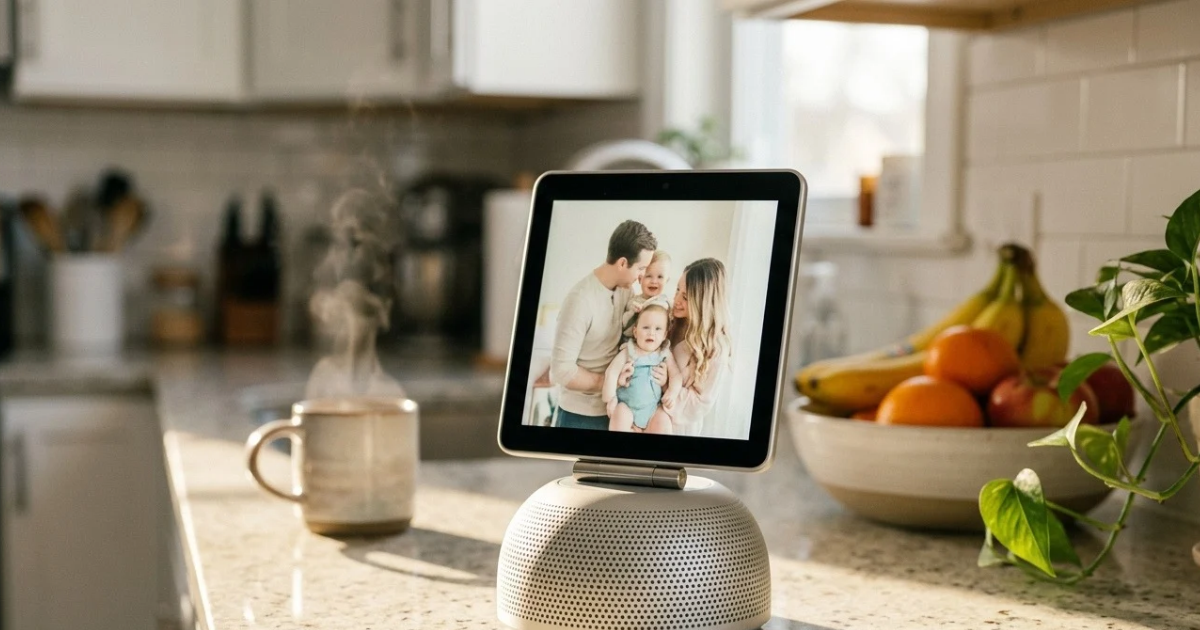
On October 13, 2026, at its “Welcome Home” launch, Apple finally pulled back the curtain on HomeView. It’s a 7-inch smart display that sits on a speaker base, recognizes the people in your house by face, and runs Apple’s new Siri AI. It costs $299. Pre-orders are open today, and it hits stores on November 13.
I’ve spent the past couple of days reading through Apple’s announcement and what the tech press is saying, and I want to talk you through it the way I would with a friend who asked, “Okay, should I actually care about this?”
One honest heads-up first. Nobody has lived with a HomeView yet, me included. It hasn’t shipped. So everything here comes from Apple’s own details and early reporting, and whenever I’m sharing an opinion instead of a fact, I’ll tell you.
Grab a coffee. Let’s dig in.
1. The One Big Idea That Makes HomeView Worth Talking About
If you only remember one thing about HomeView, make it this: it’s a screen that belongs to the whole family and to each person at the same time.
That’s more or less how Apple’s Greg Joswiak describes it. He says it’s designed to be shared by everyone in the home yet feel completely personal to each user. Now, I know. That sounds like something a marketing team polished for a week. But strip away the gloss and there’s a real problem underneath.
Think about every shared screen in your house right now. The family tablet. The TV. The old laptop in the corner. They’re all a bit of a mess, because they belong to everybody and nobody. Your partner’s notifications pop up on your screen. Your kid’s cartoon recommendations clog your streaming account. Nothing feels like it’s yours.
HomeView tries to fix that by recognizing who’s standing in front of it. Walk up, and it knows you. Your widgets, your apps, and your Siri context are right there. Walk away, and it goes back to being a friendly household display.
And on top of that, it’s a proper smart home hub. It controls lights, locks, thermostats, and cameras. It handles FaceTime calls. It plays music, podcasts, and shows. It displays photos, recipes, reminders, and calendars.
At $299, Apple isn’t treating this as a luxury toy for collectors. It’s pricing it like a product it genuinely wants in your kitchen. That tells you something.
2. Two Gorgeous Designs, and 1 Decision You’ll Have to Make
HomeView comes in two versions, so the first thing you’ll do is choose.
The tabletop model is the one you’ve probably seen in the launch photos. A 7-inch square Liquid Retina display sits on a domed speaker base, joined by a stainless steel hinge that lets you tilt the screen toward you. It comes in four colors: silver, starlight, rose pink, and space gray. The display supports True Tone and hits 500 nits, which should be plenty for a sunny kitchen.
The wall-mounted model skips the base and sits flush against the wall. It’s available in space gray and silver. You’ll need one of three purpose-built mounts from Schneider Home to hang it. The Power Mount USB-C Wall Connector starts at $59.95, and the Power Mount AC Wired starts at $79.95.
So which one? My honest opinion is that the tabletop version is the better pick for most households. Plug it in, set it down, you’re done. No drilling, no electrician, no weekend project that turns into a month.
The wall version is lovely if you’re renovating, hate the sight of cables, or want a permanent control panel next to your front door. Just remember that mount adds to the price.
There’s one more thing to keep in mind. Macworld noted that the speaker hardware lives in the base, so the wall version might not sound quite as full. Apple says the wall model delivers rich sound with two custom drivers and audio tuned for on-wall use. I’d call that “promising, but let’s hear it first.”
3. 6 People, 1 Screen: The Feature That Made Me Sit Up
Honestly, this is the part I find most interesting.
HomeView can recognize up to six people in your household. Everyone needs their own Apple Account and an iPhone or iPad on the latest software, and you enroll them through the Home app. After that, the display can switch between a shared household view and a personal one, depending on who’s looking at it.
Picture a regular Tuesday. You shuffle into the kitchen half awake, and the screen greets you with your calendar and today’s weather. Ten minutes later your partner walks by, and the display quietly swaps to their reminders and the podcast they left off yesterday. Nobody tapped anything. Nobody logged in. It just worked.
That’s the dream, anyway. I’ll be upfront that Apple hasn’t spelled out every detail about controls for younger family members, so I wouldn’t assume anything there until reviewers have spent real time with it.
HomeView also has “faces,” a lot like Apple Watch faces. MacRumors lists a Photos face, a Flow face that reacts to movement, a Snoopy face that shifts with the time of day and the weather, a Home Modular face for quick access to your accessories, and a Home Camera face that can stream up to nine live video feeds at once.
I like this more than I expected to. A smart display spends most of its life just sitting there. If that idle time looks nice and shows something useful, it’s a small thing that makes a big difference.
Privacy is the obvious worry with face recognition, and Apple knows it. The company says the camera is used only for video calls and facial recognition. I’ll come back to that in a bit.
4. The Amazing Brain Inside: A18 Chip Meets Siri AI
Under the hood, HomeView runs on Apple’s A18 chip, the same chip family that powered the iPhone 16. It also packs a 12-megapixel Center Stage camera, microphones, a speaker system, and a touchscreen. Forbes reports it runs on something called homeOS.
But the headline act is Siri AI.
I’ll admit I’d mostly stopped asking Siri anything beyond “set a timer” and “play something.” Maybe you did too. The pitch for this new version is that it understands context and can actually help.
When HomeView is paired with an iPhone or iPad that supports Apple Intelligence, Siri can pull personal context from your Messages, Calendar, and other apps. So instead of generic answers, you get ones that make sense for your day.
There’s a neat continuity trick, too. A conversation you start on HomeView can carry on in the Siri app on your iPhone, iPad, Mac, Apple Watch, or Apple Vision Pro. Ask a question while your hands are covered in flour, then pick the thread back up on the couch.
And here’s a detail I appreciate. If you don’t have an Apple Intelligence-capable device, you can still use Siri AI on HomeView for world knowledge and music discovery. You just won’t get the personal context.
Now for my little caution flag. HomeView needs an iPhone on iOS 27.2 or later, or an iPad on iPadOS 27.2 or later. If your phone is a few years old, double-check compatibility before you click that pre-order button.
5. 9 Camera Feeds and a Front Door That Finally Talks Back
If the personalization is the fun part, home security is where HomeView gets seriously practical.
Apple launched HomeView next to a new set of smart home accessories called Apple Home Collection, built with LG Electronics and Schneider Electric. It includes security cameras, a doorbell, a smart deadbolt lock, and thermostats. According to TechCrunch, when someone rings the bell, you’ll hear a chime from your HomeView.
Imagine you’re chopping onions and the doorbell goes off. Instead of wiping your hands, finding your phone, and unlocking it, you glance at the display and see who’s on the porch. Or you say, “Hey Siri, show me the backyard,” and the feed pops up. Thanks to that Home Camera face, you can watch up to nine feeds at once.
It also keeps an ear out for danger. Like the iPhone and Apple Watch, HomeView can recognize the sound of smoke and carbon monoxide alarms and send you an alert. It’s the kind of quiet, unglamorous feature you hope never to need, and you’ll be very glad it’s there if you do.
Will it replace a full security system? On its own, probably not. But as a single dashboard for cameras, locks, and alerts, it’s a smart place to start.
6. Effortless Control: Matter, Thread, and Fewer Headaches
Anyone who has built a smart home knows the frustration. One app for the lights. Another for the thermostat. A third for the speakers. And somehow none of them talk to each other.
HomeView is built to cut through that. It acts as a smart home hub, a Matter controller, and a Thread Border Router. In plain English, that means it can manage everything in your Home app, including Apple Home Collection products, HomeKit devices, and Matter-compatible accessories. When you shop, look for the “Works with Apple Home” logo.
Matter is worth a quick mention, because it’s an industry standard that lots of companies support. That means you’re not locked into Apple-branded gear. If you already have Matter bulbs, plugs, or sensors, HomeView should be able to run them.
You can control all of it two ways: tap the screen, or just talk. Lights, thermostat, locks, cameras. All hands-free if you want.
One honest limitation: there’s no third-party App Store on HomeView. It runs Apple’s built-in apps, including Calendar, Messages, Photos, FaceTime, Notes, Reminders, Music, Podcasts, Audiobooks, News, and TV, plus supported third-party audio and video apps that run from your paired iPhone. So don’t expect to install whatever you like straight onto the display.
7. 5 Everyday Moments Where HomeView Could Shine
Specs are nice, but real life happens in small moments. Here are five where HomeView looks genuinely promising. Quick reminder that these are my educated guesses based on what Apple has announced, not tested results.
1. Cooking dinner. Apple clearly sees the kitchen as HomeView’s natural home. Netzwelt reports it can show recipes step by step and help with timers. Messy hands, busy counter, no problem.
2. Calling the grandparents. FaceTime is built in, so Grandma doesn’t need to learn anything new. She calls, you answer from the counter, and the Center Stage camera keeps you in frame while you move around.
3. Getting out the door in the morning. Weather, calendar, reminders, and a playlist, all in one glance, tailored to whoever walks up first.
4. Winding down at night. Dim the lights, lock up, check the cameras, and start a podcast without ever picking up your phone.
5. Doing nothing at all. When nobody’s using it, the Photos face turns HomeView into a slideshow of your favorite memories. ITWire joked that if the smart features disappoint, it’s at least a very nice photo frame. Honestly, that’s a pretty decent safety net.
That last point matters more than it seems. A smart display only succeeds if people actually use it every day. The winners are the ones that slide into your routine so smoothly you forget they’re there.
8. Powerful Sound: 2 Drivers, 1 Woofer, and Big Ambitions
Apple didn’t just stick a speaker behind a tablet. Audio is a real part of the pitch here.
According to Macworld, the tabletop model includes two custom full-range drivers in the display, a down-firing woofer, and two force-cancelling passive radiators in the base, all tuned together as one acoustic system. It also supports Spatial Audio with Dolby Atmos for compatible content.
For music lovers, that’s encouraging. Apple Music, Apple Podcasts, Apple TV, and Apple News are all built in. If you’ve enjoyed a HomePod before, HomeView will probably feel familiar in spirit.
Is it going to replace a real stereo? Of course not. But for a kitchen, a bedroom, or a home office, a smart display that sounds better than you expect is a real bonus. I’ll hold off on celebrating until I’ve seen actual listening tests, though.
9. 3 Reassuring Privacy Points to Keep in Mind
Let’s talk about the elephant in the room. A camera and microphones in your home is a big ask, and it’s completely fair to feel cautious.
Here’s what Apple says so far. First, the camera is used only for video calls and facial recognition. Second, Siri AI draws on your personal context while keeping everyone’s information private and secure. Third, enrollment happens through the Home app, and each person needs their own Apple Account.
That’s good to hear, and privacy has long been a big part of Apple’s brand. Still, trust is built in the details, not in launch-day statements. When your HomeView arrives, take ten minutes to read through the settings. Decide who gets enrolled, and double-check what the camera and microphone are allowed to do.
10. 4 Honest Things to Know Before You Pre-Order
I’m genuinely excited about this thing, but a fair review isn’t a love letter. Here are four things worth thinking about before you spend your $299.
1. You need a fairly recent iPhone or iPad. HomeView requires iOS 27.2 or iPadOS 27.2 or later, and the smartest Siri features need an Apple Intelligence-capable device.
2. It’s not for sale in the European Union. Apple says Siri AI isn’t currently available in iOS in the EU, and that it’s working constructively with regulators to find a way forward. If you’re in the US, this won’t affect you. But if you have friends or family in Europe, it’s good to know.
3. There’s no third-party App Store. You get Apple’s apps and supported audio and video apps from your paired iPhone. It keeps things simple, but it also limits flexibility.
4. It’s a first-generation product. TechCrunch suggested this may only be the first phase of Apple’s smart home plans. First-generation devices can have rough edges, and Apple has pushed this category back before. Early reviews will tell us a lot.
None of these are dealbreakers. They’re just the fine print that separates a smart purchase from an impulse buy.
11. 3 Big Names, 1 Newcomer: How HomeView Stacks Up
Apple is walking into a crowded room. Amazon has the Echo Show line. Google has the Nest Hub. Both have years of head start, loyal customers, and a habit of cutting prices.
So why would anyone pick HomeView?
If you already live in Apple’s world, the answer is simple: it fits. Your iPhone, Messages, Calendar, FaceTime contacts, Apple Music library, and HomeKit gear all work together. For people already invested in the ecosystem, that connection is the whole point.
If you’re a die-hard Alexa or Google Assistant household, the case is a lot weaker. Switching ecosystems is a pain, and a competing display might already do what you need for less. I haven’t compared specs line by line, and rival prices move around constantly, so check current numbers before you decide.
Apple is, as several outlets pointed out, late to this race. But late hasn’t stopped Apple before. The iPhone wasn’t the first smartphone, and the Apple Watch wasn’t the first smartwatch. Sometimes showing up later with something polished works out fine.
12. 5 Kinds of People Who Should Seriously Consider HomeView
Let me make this practical. HomeView looks like a strong fit if you’re:
- A deep Apple household. iPhones, iPads, maybe a Mac or two? This slides right in.
- A busy family. Six profiles and shared plus personal views suit a home where everyone needs something different.
- A smart home beginner. Matter support and the Home app give you one clean place to start.
- A security-minded homeowner. Cameras, a doorbell, a lock, and alerts in one view are hard to beat.
- A music or podcast lover. Strong audio and Apple Music and Podcasts built in covers a lot of daily listening.
And you might want to wait if you use Android, own an older iPhone, live in the EU, or simply prefer to see real reviews first. There’s no shame in waiting a few weeks.
The Bottom Line: 3 Takeaways Worth Remembering
After digging through everything, here’s where I land.
First, HomeView is the smart display Apple fans have waited years for, and at $299 it’s far more approachable than many people expected.
Second, its biggest strength is personalization. Recognizing up to six people and giving each one a tailored experience is a genuinely fresh idea in this category.
Third, it’s still unproven. Real kitchens, real kids, real Wi-Fi, and real Siri conversations are the true test, and we won’t know the answer until reviews start landing after November 13.
If you’re curious, pre-ordering is a fairly low-risk move, and you can always read first impressions before your unit ships. If you’re cautious, waiting a few weeks costs you nothing.
Either way, this is the most interesting thing Apple has done for the home in years. And honestly? It feels good to be excited about a smart speaker again.
5 Quick Answers About Apple HomeView
How much does it cost? It’s $299 in the US for both the tabletop and wall-mounted models. Wall mounts from Schneider Home are sold separately, starting at $59.95.
When can I get it? Pre-orders opened October 13, 2026, and it arrives in stores on November 13.
Does it work with non-Apple smart home gear? Yes. It supports Matter and works with HomeKit and “Works with Apple Home” accessories.
Can more than one person use it? Yes. It recognizes up to six people, each with a personalized Home Screen.
What phone do I need? An iPhone running iOS 27.2 or later, or an iPad running iPadOS 27.2 or later.
Pricing and availability reflect Apple’s October 13, 2026 announcement and may vary by region. Details are based on launch-day reporting and have not been tested hands-on.
References and Sources
- 9to5Mac, “Apple unveils new HomeView smart display: pre-order today for $299”: https://9to5mac.com/2026/10/13/apple-homeview-announced-features-price-release-date/
- TechCrunch, “Apple makes another push into the smart home market with HomeView”: https://techcrunch.com/2026/10/13/apple-makes-another-push-into-the-smart-home-market-with-homeview/
- MacRumors, “Apple Announces ‘HomeView’ Smart Home Hub”: https://www.macrumors.com/2026/10/13/apple-announces-homeview-smart-home-hub/
- Macworld, “Apple’s ‘completely personal’ HomeView smart-home hub is built for sharing”: https://www.macworld.com/article/3259547/apples-completely-personal-homeview-smart-home-hub-is-built-for-sharing.html
- Macworld, “Apple HomeView guide: Price, release date, features, and everything you need to know”: https://www.macworld.com/article/676817/new-homeview-homepod-mini-screen-rumours-release-date.html
- Forbes, “Apple’s Smart Home Comeback Now Official With New HomeView, Apple TV And More”: https://www.forbes.com/sites/paullamkin/2026/10/13/apples-smart-home-comeback-now-official-with-new-homeview-apple-tv-and-more/
- Dexerto, “Apple reveals HomeView smart home display with facial recognition and major Siri upgrade”: https://www.dexerto.com/entertainment/apple-reveals-homeview-smart-home-display-with-facial-recognition-and-major-siri-upgrade-3418528/
- ITWire, “Apple finally puts a screen on the kitchen bench with a HomeView”: https://itwire.com/your-it-news/home-it/apple-finally-puts-a-screen-on-the-kitchen-bench-with-a-449-homeview-while-apple-tv-4ks-price-more-than-doubles-in-a-year
- Interesting Engineering, “Apple unveils HomeView, stores in November”: https://interestingengineering.com/news/apple-unveils-homeview-stores-november
- netzwelt, “Apple stellt HomeView vor”: https://www.netzwelt.de/news/259538-apple-stellt-homeview-steckt-neuen-zentrale-fuer-entertainment-smart-home.html
- Apple, HomeView product and requirements page (India store): https://www.apple.com/in/shop/buy-home/apple-homeview

I am Bhaktahari Dahal, the founder and writer of Byte and Trail. I passionately research technology, blogging, and diverse fields to deliver clear, simplified, and engaging content for my readers. Welcome aboard!